A walkthrough of a phishing scam currently hitting colleges and universities, what it looks like, why it’s sneaky, and what to do if one lands in your inbox.
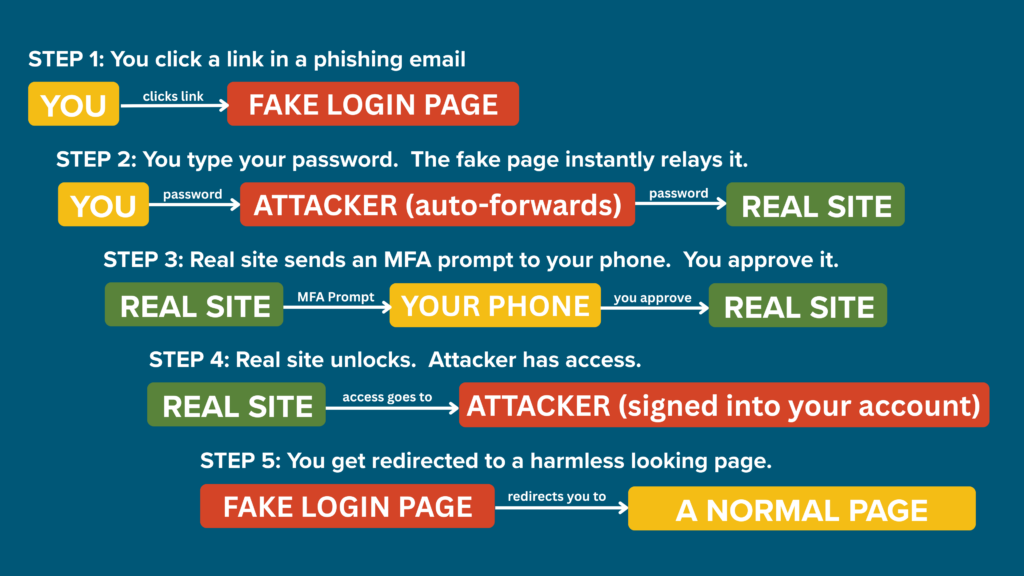
Source: REN-ISAC AiTM Advisory. REN-ISAC is the cybersecurity threat-sharing organization for higher education, with about 800 member colleges and universities. When they put out an advisory, it means real campuses are already seeing the attack.
Threat at a Glance
| Threat type | Adversary-in-the-Middle (AiTM) phishing |
| Targets | Faculty, staff, and researchers at colleges and universities |
| What it steals | Your password AND your active login session, meaning MFA gets bypassed |
| Common disguises | Shared file notices, mailbox-full warnings, HR or payroll messages, DocuSign requests |
| Why it’s dangerous | The fake page passes you through to the real one, so everything feels normal |
How It Works
Imagine someone sets up a fake bank lobby that looks exactly like your real bank. You walk in, hand the teller your ID and your PIN, and they pass it through a window to a real teller at the real bank next door. The real bank does its normal verification, including texting you a code, and you read the code out loud. Everything feels normal. You finish your “transaction” and walk out. Meanwhile, the person in the middle now has a copy of your bank’s “you’re logged in” pass and can walk into the real bank as you for the rest of the day.
That’s what’s happening online. The attacker sends you to a fake login page that secretly forwards everything to the real one. You type your password, they get it. You approve the Duo prompt, they get the access. The page sends you somewhere normal-looking afterward, so nothing seems off. But your account is now wide open to them.
The Red Flags
The web address doesn’t match. The fake page looks perfect, but the URL in your browser’s address bar won’t quite match the real one. Universities of Wisconsin and Microsoft logins end in addresses like wisconsin.edu or microsoftonline.com. Fakes use lookalikes such as wisconsin-login.com, login-microsoftonline.net, or office365-secure.com.
You arrived by clicking an email link. AiTM attacks almost always start with an unexpected email containing a link to “review a file,” “verify your account,” or “listen to a voicemail.”
An MFA prompt you didn’t trigger. If your phone buzzes with an MFA approval request and you weren’t actively logging in, that prompt is someone else trying to log in as you.
Other Warning Signs
Unexpected file shares. Always verify with the sender through a separate channel like a phone call or in-person before clicking.
Urgency. Phrases like “action required” or “your account will be locked” are designed to make you click before thinking.
Generic greetings or slightly-off branding. Look for “Dear User” instead of your name, or logos that look a little stretched or pixelated.
Lookalike sender addresses. The display name might say “Microsoft 365” but the actual email address ends in something unrelated.
What to Do if You Get a Real One
Check the address bar before typing anything. The URL is the giveaway. If it looks even slightly off, close the tab.
Don’t log in from email links. Open a new tab and go to the site yourself, or use a saved bookmark.
Deny unexpected MFA prompts. Don’t approve a push just to make it stop.
Pay attention to number-matching codes. Actually look at the number, don’t tap on autopilot.
Report it. Use the Report Phishing button in Outlook or forward the email to the help desk.
If you entered your password or approved a prompt, change your password immediately and contact the help desk right away. They can kick the attacker out of your active session, but only if they know quickly.
You can find contact information for your campus help desk here: Universities of Wisconsin (UW System) – IT Help Desks Contact Information.